

Carmen course sites are available for all academic courses listed in the Registrar’s system. Individuals listed as an instructor for a course in the Registrar's system will be able to use the Generate Academic Course functionality. Once this is done, content can be added and the Carmen course can be published.
Instructional staff have access to edit a Carmen course as soon as it is generated. Students enrolled in the course through the Registrar will be added after a short amount of time. If student enrollments are not present 24 hours after the course is created, contact us at carmen@osu.edu.
Students and instructional staff can see all the CarmenCanvas courses they are enrolled in on the Carmen landing page, along with an indicator of whether the course is not generated, not published, or published.
If you have questions about forum course creation, please visit Forum courses.
Generating a Course
- Navigate to your course list on the Carmen landing page.
Find the course you wish to generate and click the three-dot button on the Actions Column.
Image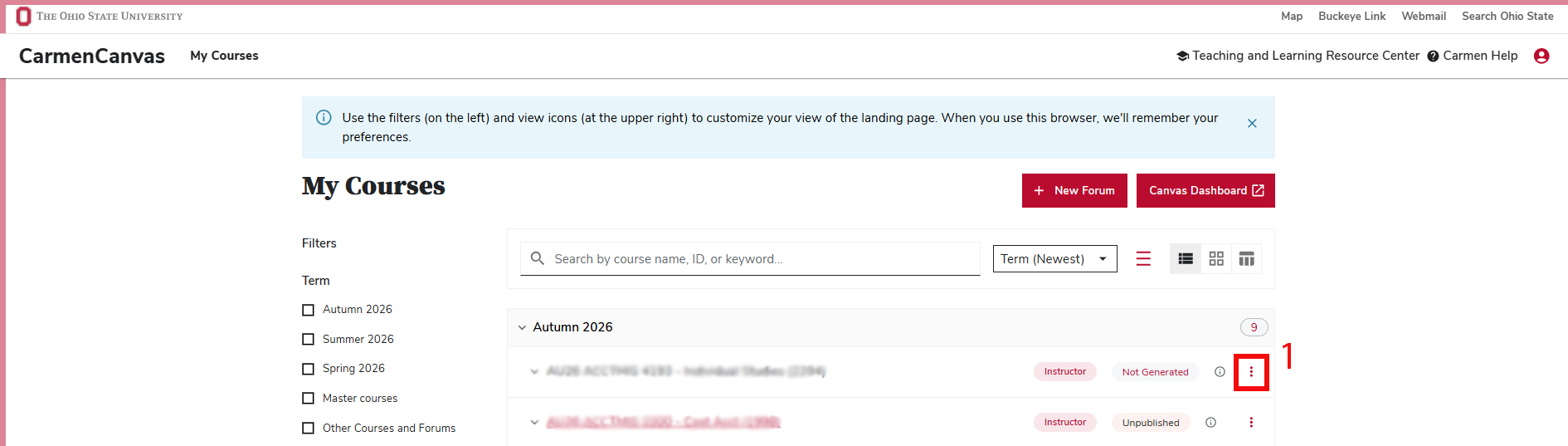
From the drop-down menu that appears, click the “Generate Course” button with the magic wand icon.
Image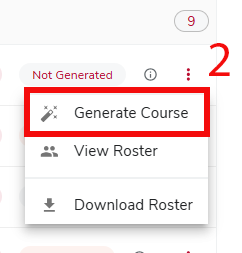
Then, in the window that appears, click the red "Generate” button to generate your course.
Image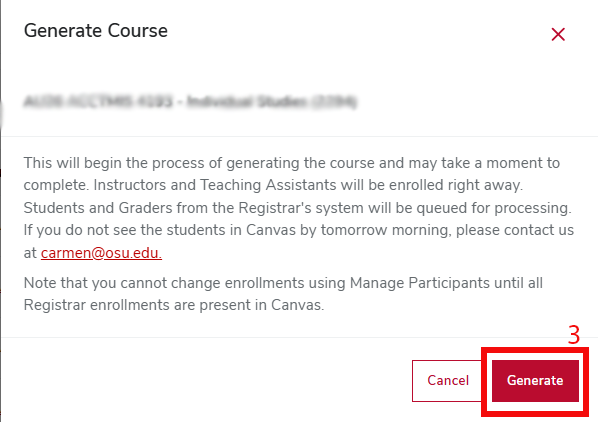
Your course is now in the unpublished status. Students will see the course has been generated in Carmen but will not have access until you publish the course.